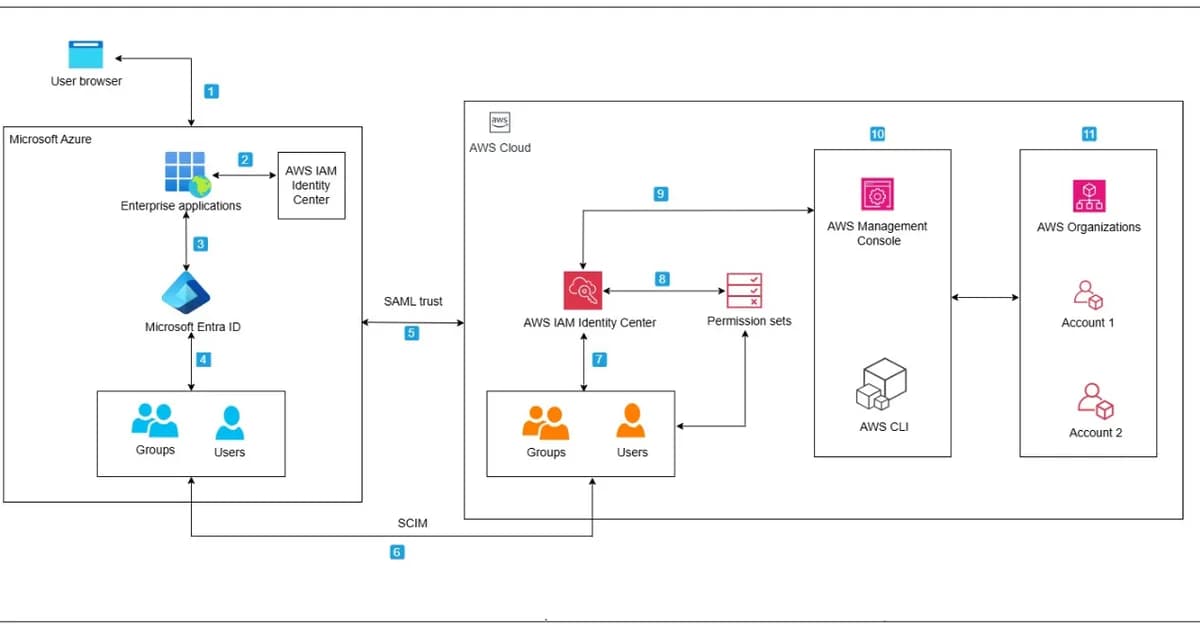
This article discusses how to use AWS Identity and Access Management (IAM) Identity Center with Security Assertion Markup Language (SAML) 2.0 identity providers like Microsoft Entra ID for federated access management in a multi-account environment. The focus is on implementing Attribute-Based Access Control (ABAC) using session tags, which allows organizations to enforce granular access control policies based on user attributes rather than static roles or permissions.
Key Concepts and Steps
-
Federating Access with IAM Identity Center:
- Configure an IAM Identity Center instance.
- Set up a SAML 2.0 identity provider (e.g., Microsoft Entra ID).
- Create permission sets that map to AWS resources, such as specific roles or permissions.
-
Reserved Roles and Permission Sets:
- Use reserved roles in IAM Identity Center to allow users to assume roles across multiple accounts.
- Define permission sets that specify which roles can be assumed by users based on their attributes (e.g., group membership).
-
Session Tags for ABAC:
- Configure Microsoft Entra ID to pass session tags during the SAML assertion process.
- Use these tags in IAM Identity Center to dynamically apply access control policies
Read the full article at AWS Security Blog
Want to create content about this topic? Use Nemati AI tools to generate articles, social posts, and more.
2
Tags
Contents

Ali NematiWritten by Ali
![[AINews] The Unreasonable Effectiveness of Closing the Loop](/_next/image?url=https%3A%2F%2Fmedia.nemati.ai%2Fmedia%2Fblog%2Fimages%2Farticles%2F600e22851bc7453b.webp&w=3840&q=75)



