Virtualization for DevOps Beginners
Virtual Machines (VMs) are essential tools in the DevOps toolkit, allowing developers and operations teams to create isolated environments that mimic production systems on their local machines. This article will guide you through setting up VMs using VirtualBox and connecting to them via SSH or Remote Desktop.
Table of Contents
- Introduction to Virtualization
- Setting Up VirtualBox
- Creating Your First VM
- Networking: Bridged vs NAT
- Connecting to Your VM
Introduction to Virtualization
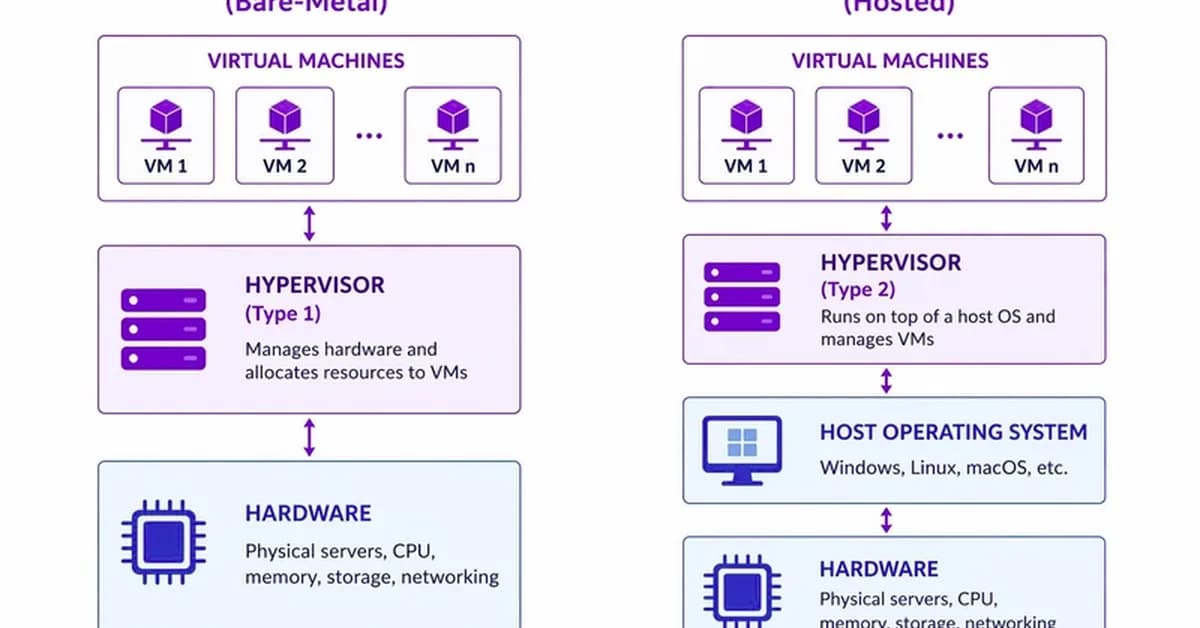
Virtual Machines (VMs) are software-based computers that run on your physical hardware, allowing you to create isolated environments for development and testing. This is particularly useful in DevOps where consistency across different stages of the deployment pipeline is crucial.
Key Concepts
- Host Machine: The physical machine running the virtualization software.
- Guest VMs: Virtual machines running inside the host machine.
- Bridged Adapter: Assigns a real IP address to the guest VM, allowing it to communicate directly with other devices on your network.
- NAT (Network Address Translation): Isolates the guest VM from external networks but allows it to
Read the full article at DEV Community
Want to create content about this topic? Use Nemati AI tools to generate articles, social posts, and more.
26
Contents

Ali NematiWritten by Ali