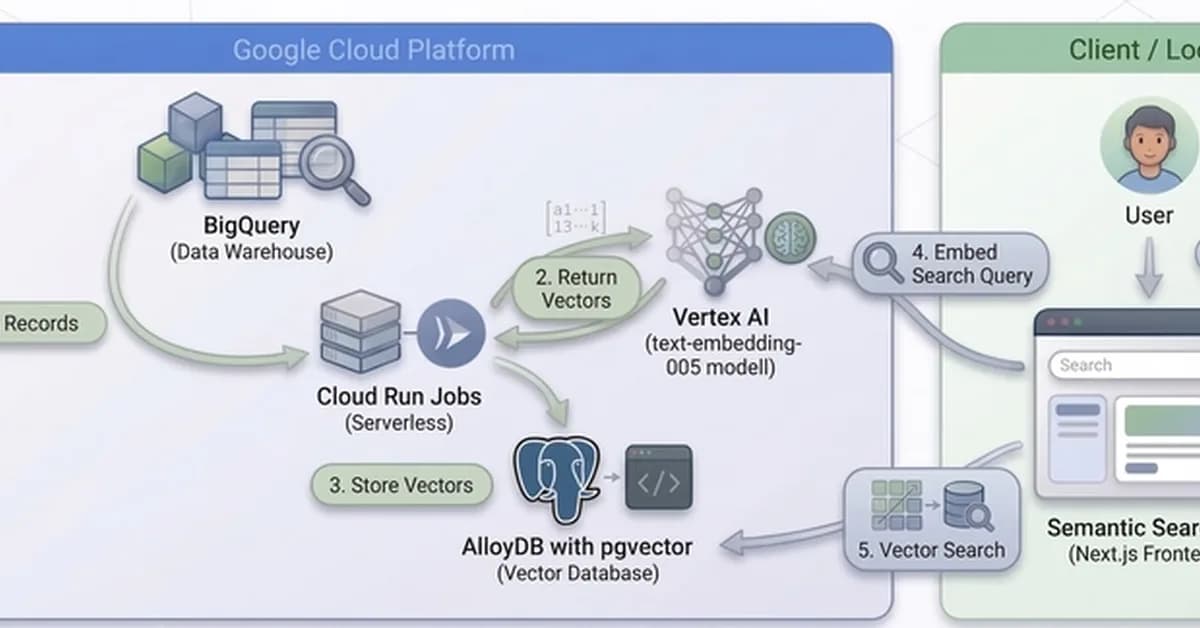
This article provides a comprehensive guide on how to build and deploy a scalable Retrieval-Augmented Generation (RAG) system using Google Cloud services. The primary focus is on creating an embedding pipeline that can handle large datasets efficiently, leveraging the power of Cloud Run Jobs for parallel processing and AlloyDB with pgvector for efficient vector storage and querying.
Key Components:
- Cloud Run Jobs: Used to create a highly scalable and parallelized process for generating embeddings.
- AlloyDB: A PostgreSQL-compatible database that supports advanced features like pgvector, which is essential for storing and querying high-dimensional vectors efficiently.
- pgvector: An extension for PostgreSQL (supported by AlloyDB) that allows efficient storage and querying of vector data using ScaNN indexes.
Steps Covered in the Article:
-
Setup Environment:
- Install necessary tools like Docker, Git, and Node.js.
- Clone the GitHub repository containing the source code for the RAG system.
-
Deploy Infrastructure:
- Use Terraform scripts to deploy the required infrastructure on Google Cloud Platform (GCP). This includes setting up AlloyDB instances and configuring network settings.
-
Build and Deploy Application:
- Containerize
Read the full article at DEV Community
Want to create content about this topic? Use Nemati AI tools to generate articles, social posts, and more.
32
Contents

Ali NematiWritten by Ali
![[AINews] The Unreasonable Effectiveness of Closing the Loop](/_next/image?url=https%3A%2F%2Fmedia.nemati.ai%2Fmedia%2Fblog%2Fimages%2Farticles%2F600e22851bc7453b.webp&w=3840&q=75)



