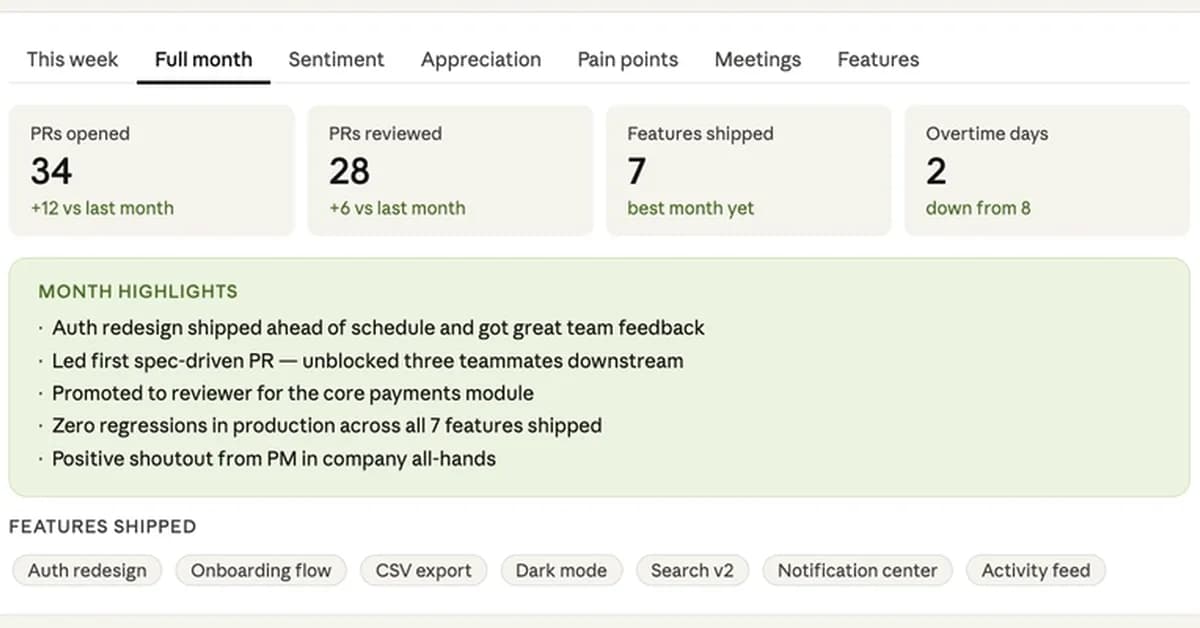
Creating a personalized dashboard using Claude (an AI assistant) is an innovative way to gain insights into your work patterns and productivity over time. Here's a summary of the key points from the article along with some additional guidance on how you can implement such a system:
Key Points:
- Journaling: Keeping a daily log in bullet point format.
- Skill File (
SKILL.md): A markdown file that defines when to trigger the dashboard, where to read data from (e.g., Google Drive), and what JSON schema to produce. - Data Analysis: Claude analyzes your journal entries based on rules you define in
SKILL.md. - Dashboard Rendering: The analyzed data is rendered into an interactive HTML widget with various tabs for different insights.
Steps to Implement:
-
Set Up Your Journal:
- Start keeping a daily log of your activities, challenges, and achievements.
- Store this journal on Google Drive or another accessible location.
-
Create the
SKILL.mdFile:- Define when Claude should trigger the dashboard (e.g., "Show me my work insights").
- Specify where to read data from (Google Drive file ID).
Read the full article at DEV Community
Want to create content about this topic? Use Nemati AI tools to generate articles, social posts, and more.
148
Contents

Ali NematiWritten by Ali