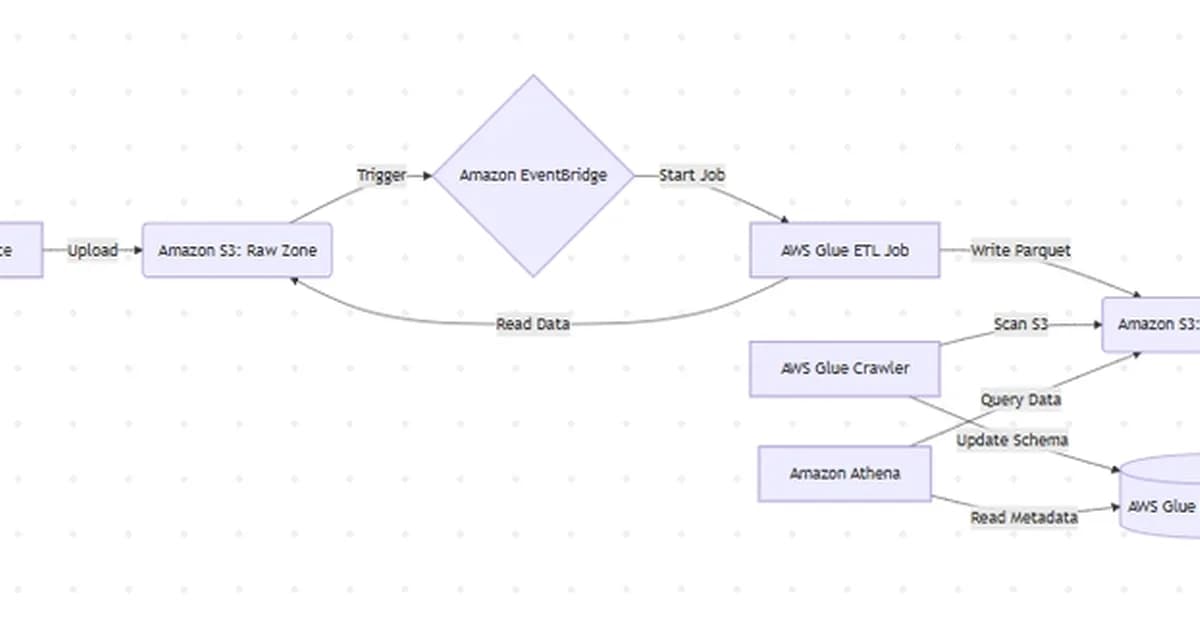
Cataloging data with AWS Glue Crawlers is indeed an essential step for making your data accessible and manageable within a data lake environment. Here’s how you can proceed with this step:
Step 6: Cataloging the Data with AWS Glue Crawlers
What to Do:
-
Navigate to AWS Glue Console:
- Open the AWS Management Console and navigate to the AWS Glue service.
-
Create a New Crawler:
- Click on "Crawlers" in the left navigation pane.
- Click the "Add crawler" button to create a new crawler.
-
Configure the Crawler:
- Name: Give your crawler an appropriate name, such as
EnterpriseDataLakeCatalog. - IAM Role: Select the IAM role you created in Step 3 (e.g.,
glue-service-role-EnterpriseDataLake). - Database: Choose or create a database where the metadata will be stored. You can use AWS Glue’s default databases or create your own.
- Target Data Store:
- Select "S3" as the data store type.
- Enter the path to your
curated/S
- Name: Give your crawler an appropriate name, such as
Read the full article at DEV Community
Want to create content about this topic? Use Nemati AI tools to generate articles, social posts, and more.
6
Contents

Ali NematiWritten by Ali
![[AINews] The Unreasonable Effectiveness of Closing the Loop](/_next/image?url=https%3A%2F%2Fmedia.nemati.ai%2Fmedia%2Fblog%2Fimages%2Farticles%2F600e22851bc7453b.webp&w=3840&q=75)



