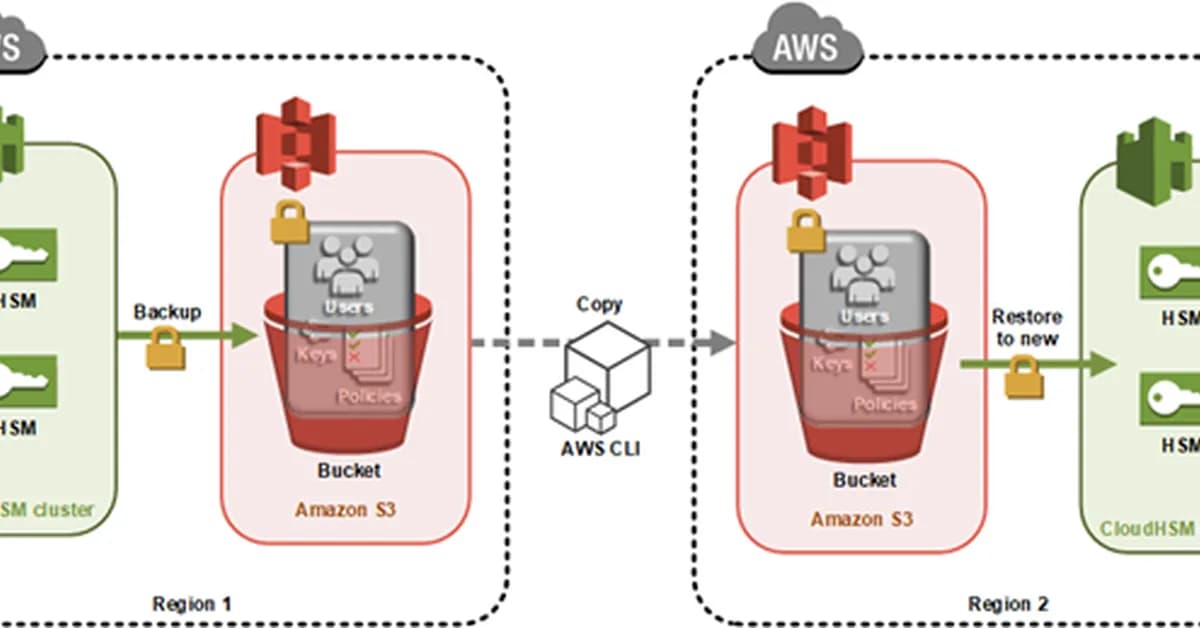
The guide provided outlines the process of creating and copying a backup of an AWS CloudHSM cluster from one region to another. Below is a summary and key steps involved:
Key Steps
-
Create and Activate Your Initial Cluster in Region 1:
- Create a new AWS CloudHSM cluster.
- Add users (admin, crypto officers, crypto users).
- Generate keys within the HSM.
-
Trigger Backup Creation:
- To create a backup, add an additional HSM to your existing cluster and then remove it once the backup is triggered.
- Record the backup ID which will be used later for copying.
-
Configure IAM Permissions:
- Ensure that you have the necessary permissions to copy backups between regions.
- Example policy provided in the guide includes actions such as
cloudhsm:*,ec2:*andiam:*.
-
Copy Backup from Region 1 to Region 2:
- Use the AWS CLI command
aws cloudhsmv2 copy-backup-to-region. - Provide the destination region, source cluster ID, and backup ID (if specific).
- Use the AWS CLI command
-
**Create New Cluster in Region 2 Using Cop
Read the full article at AWS Security Blog
Want to create content about this topic? Use Nemati AI tools to generate articles, social posts, and more.
4
Contents

alinemati1983-6987Written by alinemati1983-6987