to run npx cdk bootstrap once per AWS account and region. If you're working in a different region or want to use another IAM identity, you can specify the environment using:
shell1npx cdk bootstrap aws://<account-id>/<region>
This command sets up the necessary resources for CDK deployments in that specific environment.
Defining Infrastructure with AWS CDK
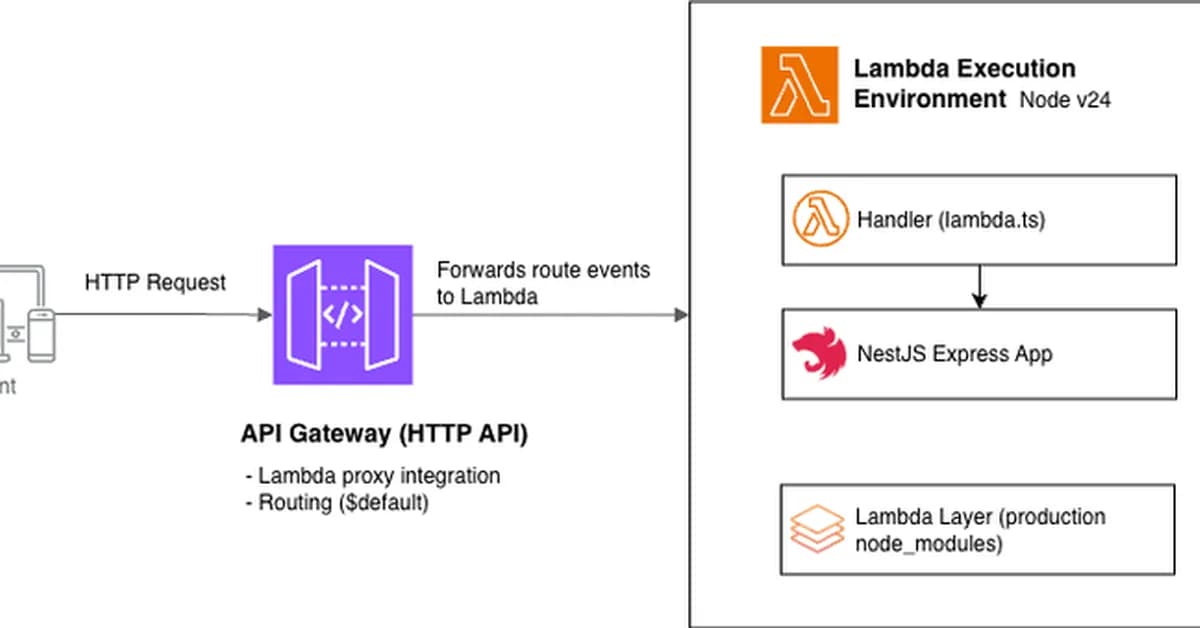
Now that your AWS account is bootstrapped and your credentials are configured, you can define your infrastructure using AWS CDK. We'll create a stack that provisions an API Gateway backed by our Lambda function.
1. Install Required Packages
First, install the necessary packages for defining serverless applications in CDK:
shell1npm install --save-dev @aws-cdk/aws-apigateway @aws-cdk/aws-lambda-nodejs @aws-cdk/aws-iam
This installs the AWS CDK constructs for API Gateway and Lambda.
2. Define Your Stack
Open lib/infra-stack.ts (or similar) in your editor, and replace its contents with the following code:
typescript1import * as cdk from 'aws-cdk-lib'; 2import { Construct } from 'constructs 3 4[Read the full article at DEV Community](https://dev.to/ajeetchaulagain/how-to-deploy-nestjs-to-aws-lambda-using-cdk-and-github-actions-3lf8) 5 6--- 7 8**Want to create content about this topic?** [Use Nemati AI tools](https://nemati.ai) to generate articles, social posts, and more.
2
Contents

Ali NematiWritten by Ali
![[AINews] The Unreasonable Effectiveness of Closing the Loop](/_next/image?url=https%3A%2F%2Fmedia.nemati.ai%2Fmedia%2Fblog%2Fimages%2Farticles%2F600e22851bc7453b.webp&w=3840&q=75)



