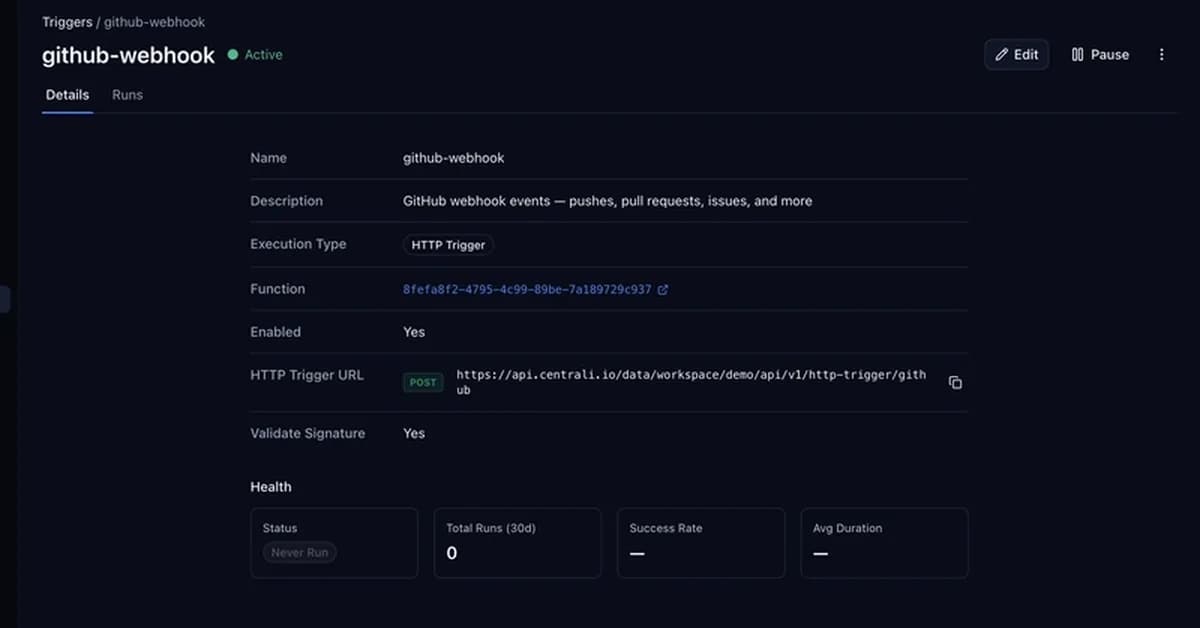
The article provides a detailed guide on how to store and manage GitHub webhook events using Centrali, a platform that helps in handling webhooks from various providers like Stripe, Shopify, Twilio, etc. Here's a summary of the key steps involved:
-
Create a Function:
- Use the
@centrali-io/centrali-sdkpackage to create a function that will handle incoming webhook events. - The function should accept JSON data as input and insert it into a collection named
github-events.
- Use the
-
Set Up Webhook Verification:
- Configure the Centrali trigger to verify signatures for GitHub webhooks using the header
x-hub-signature-256. - Use the regex pattern
sha256=(.+)to extract the signature from the header. - Ensure that the secret used for verification is stored securely and passed as an environment variable.
- Configure the Centrali trigger to verify signatures for GitHub webhooks using the header
-
Create a Collection:
- Create a collection named
github-eventsin Centrali where all incoming webhook events will be stored. - Enable schema discovery on this collection to automatically detect and structure the fields from the webhook data.
- Create a collection named
-
Query Stored Events:
- Use the Centrali SDK to
Read the full article at DEV Community
Want to create content about this topic? Use Nemati AI tools to generate articles, social posts, and more.
Views244

Ali NematiBlogUI.author_articles