<p>Android developers utilizing the EngageLab SDK are strongly advised to upgrade to the latest version promptly.</p>
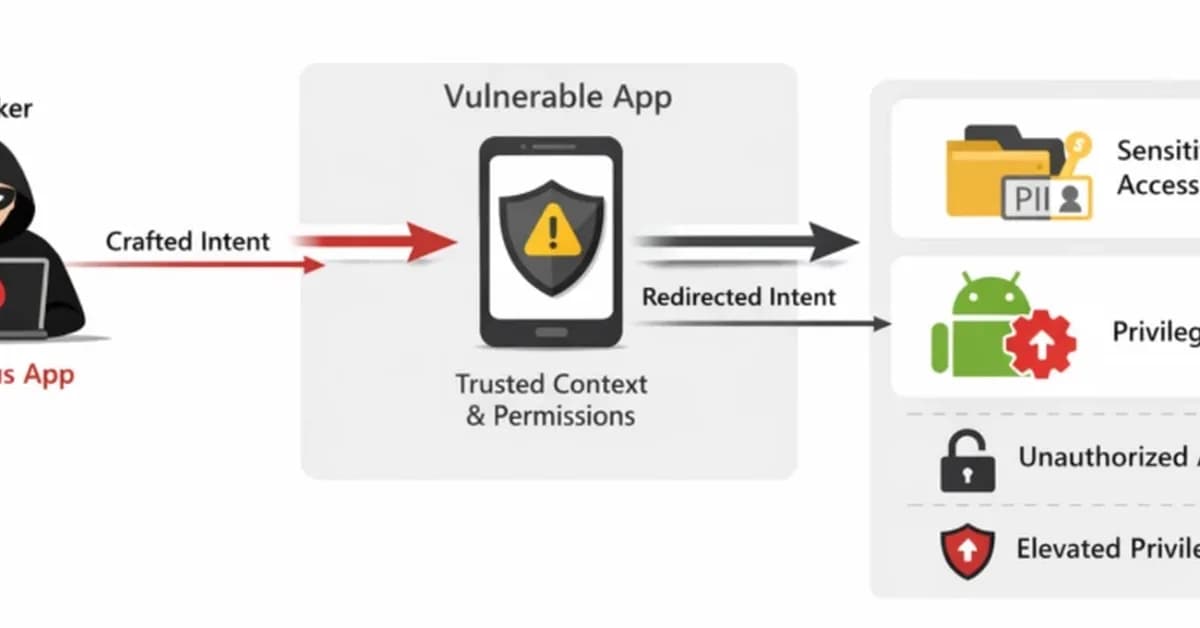
<p>Our research indicates that integrating external libraries can inadvertently introduce features or components that may compromise application security. Specifically, adding an exported component to the merged Android manifest could be unintentionally overlooked, resulting in potential attack surfaces.</p>
<p>To keep your apps secure, always review the merged Android manifest, especially when you incorporate third-party SDKs. This helps you identify any unexpected exported activities, services, or content providers that might pose security risks.</p>
<p>Here are some additional steps to mitigate and protect against similar vulnerabilities:</p>
<ul>
<li><strong>Regularly update dependencies:</strong> Ensure all external libraries and frameworks are up-to-date with the latest security patches.</li>
<li><strong>Audit merged manifests:</strong> Regularly inspect the final AndroidManifest.xml file after merging multiple modules or SDKs to identify any unintended exported components.</li>
<li><strong>Implement strict permissions:</strong> Use restrictive permission settings for content providers and other critical components to minimize potential exposure.</li>
<li><strong>Use security tools:</strong> Leverage static analysis tools like <a href="https://developer.android.com
Read the full article at Malware Analysis, News and Indicators - Latest topics
Want to create content about this topic? Use Nemati AI tools to generate articles, social posts, and more.
Views175

Ali NematiBlogUI.author_articles