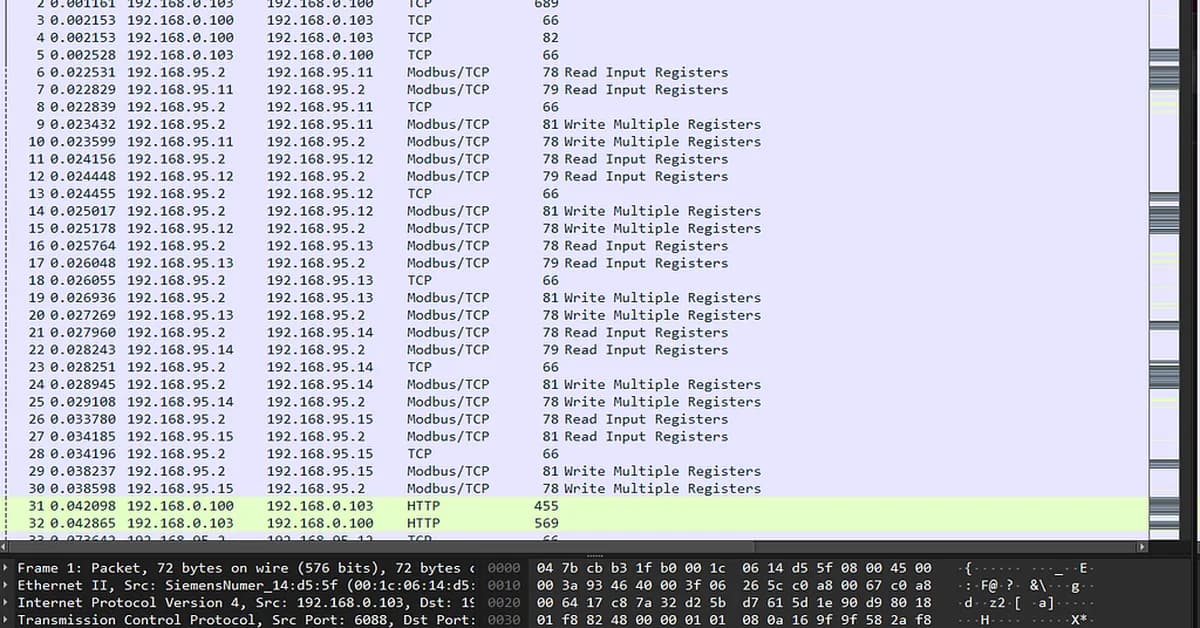
The article "OT Reconnaissance with Wireshark and GrassMarlin" provides a detailed guide on how to use two powerful tools for conducting reconnaissance in Operational Technology (OT) environments. The primary focus is on understanding network traffic, identifying anomalies, and mapping out the OT network topology. Here's a summary of key points from the article:
Tools Overview
- Wireshark: A packet analyzer that captures live network data or reads from a capture file to analyze network traffic.
- GrassMarlin: An open-source tool developed by NSA for passive ICS/SCADA network mapping, which automatically generates network topologies based on PCAP files.
Wireshark Usage
-
Installation and Setup:
- Install Wireshark via package managers or download from the official website.
- Use
tsharkcommand-line tool to capture packets in real-time or analyze saved captures (baseline_all.pcap).
-
Basic Commands:
- Capture live traffic:
sudo tshark -i eth0 - Analyze a PCAP file:
tshark -r baseline_all.pcap
- Capture live traffic:
-
Filtering and Analysis:
- Apply filters to focus on
Read the full article at InfoSec Write-ups - Medium
Want to create content about this topic? Use Nemati AI tools to generate articles, social posts, and more.
2
Tags
Contents

Ali NematiWritten by Ali
![[AINews] The Unreasonable Effectiveness of Closing the Loop](/_next/image?url=https%3A%2F%2Fmedia.nemati.ai%2Fmedia%2Fblog%2Fimages%2Farticles%2F600e22851bc7453b.webp&w=3840&q=75)



