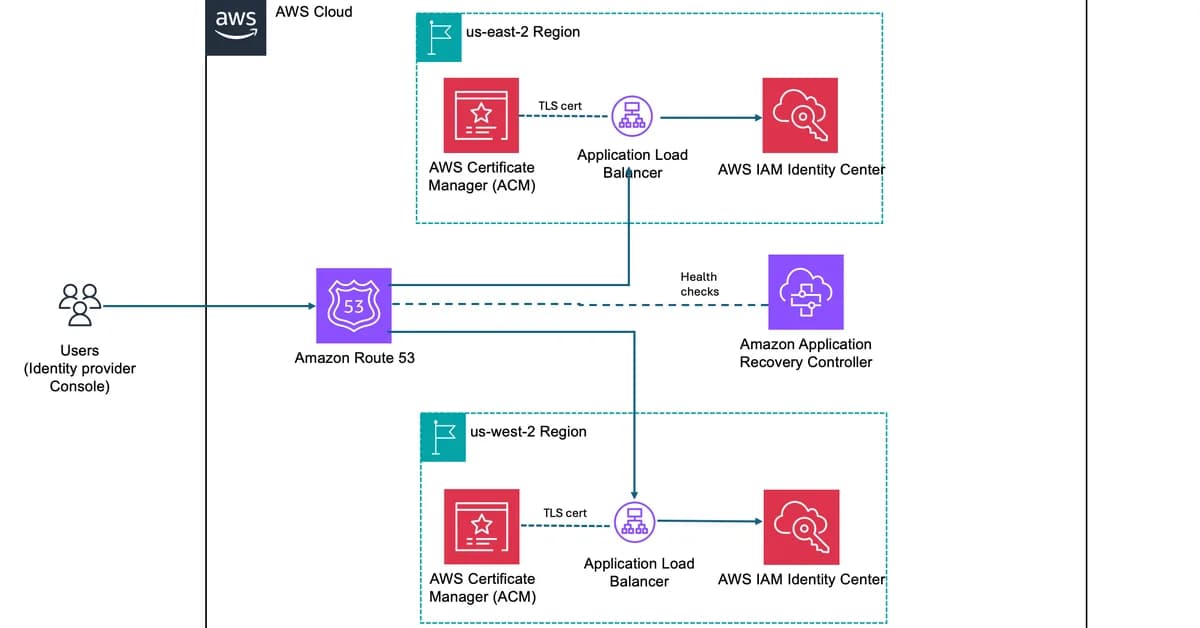
The provided instructions detail how to set up a vanity domain for AWS IAM Identity Center (formerly known as AWS Single Sign-On) using Route 53 and ACM. Here's a summary of the steps involved:
-
Create a Route 53 Hosted Zone:
- Navigate to the Route 53 console.
- Create a hosted zone for your vanity domain, e.g.,
aws.mycompany.com. - Note down the NS records created by Route 53.
-
Delegate Your Subdomain from Parent Domain:
- If your parent domain (
mycompany.com) is managed in Route 53, create an NS record pointing to the new hosted zone's name servers. - If your parent domain is managed elsewhere, add an NS record for
aws.mycompany.comusing the four name server values from the previous step.
- If your parent domain (
-
Request an ACM Certificate:
- Go to ACM in the primary Region of IAM Identity Center (e.g., us-east-2).
- Request a public certificate for your vanity domain (
aws.mycompany.com) and its regional sub-domain (e.g.,us-east-2.aws.mycompany.com). - Use DNS validation
Read the full article at AWS Security Blog
Want to create content about this topic? Use Nemati AI tools to generate articles, social posts, and more.
2

Ali NematiWritten by Ali