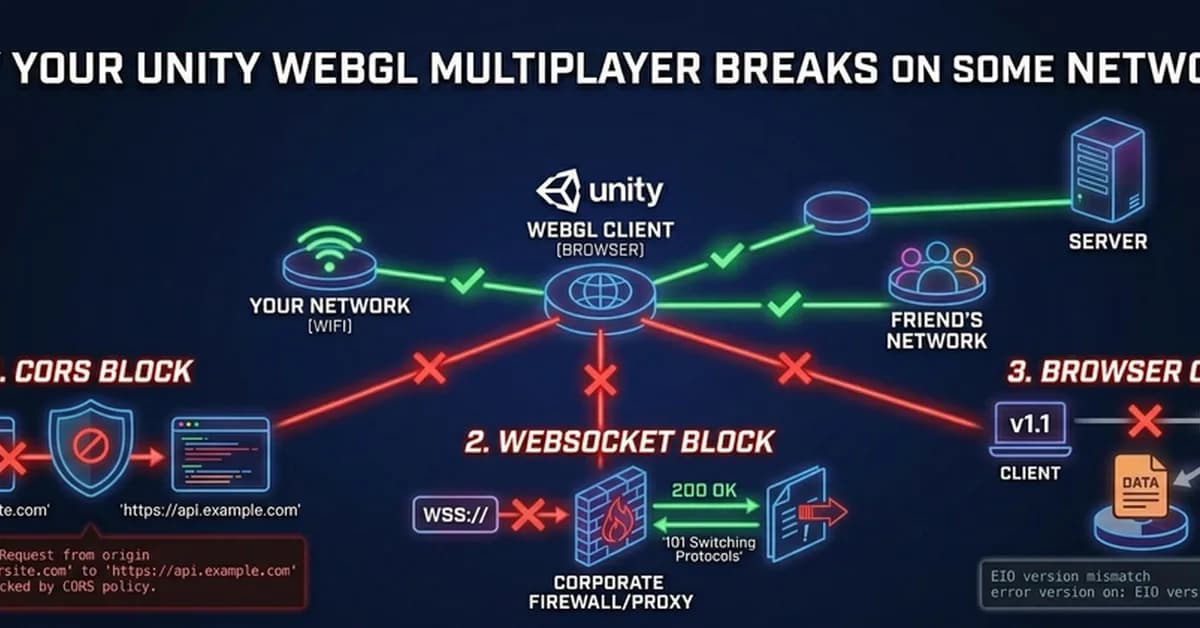
WebGL multiplayer issues can be quite frustrating due to the variety of environments and network conditions players might encounter. Based on your detailed breakdown, here are some key takeaways and steps for troubleshooting WebGL multiplayer problems:
Common Issues and Symptoms
-
WebSocket Blocked by Proxy
- Symptom: Works locally but fails elsewhere.
- Cause: Network proxies or firewalls blocking WebSocket connections.
- Check:
- Ensure the server returns
200 OKwithAccess-Control-Allow-Originin response to an OPTIONS preflight request. - Verify that WebSocket connections return a
101 Switching Protocolsstatus code instead of200.
- Ensure the server returns
-
CORS Issues
- Symptom: Works standalone but fails when loaded from the browser.
- Cause: Missing or incorrect CORS settings on the server.
- Check:
- Ensure your server has appropriate
Access-Control-Allow-Originheaders set to match the page origin.
- Ensure your server has appropriate
-
Mixed Content
- Symptom: Works over HTTP but fails over HTTPS.
- Cause: Using a WebSocket URL (
ws://) instead ofwss://. - **Check:
Read the full article at DEV Community
Want to create content about this topic? Use Nemati AI tools to generate articles, social posts, and more.
18
Tags
Contents

Ali NematiWritten by Ali
![[AINews] The Unreasonable Effectiveness of Closing the Loop](/_next/image?url=https%3A%2F%2Fmedia.nemati.ai%2Fmedia%2Fblog%2Fimages%2Farticles%2F600e22851bc7453b.webp&w=3840&q=75)



